How Thryve works, with two projects in one engine
Thryve is a multithreading task engine written in Rust, with a C API for C, C++ and other languages that can call C. You describe your work as tasks, and Thryve runs them on a pool of worker threads and hands each result to the step that needs it, so your program needs no thread code of its own.
This write-up follows a program through Thryve from start to finish: starting an engine, adding plugins, sending plain tasks, why Thryve also has advanced tasks, observers, what happens inside the engine, and how a run ends. Each part has a small example. The last part goes through an example from the repo, where one engine runs two unrelated projects at the same time. The first release, 0.1.0, runs on Windows only for now.
Starting an engine
A program starts Thryve in one of two ways. Interactively, someone starts it from a command prompt or by double-clicking it, and it runs until a task ends the run. As a Windows service, it runs in the background under Windows’ service manager. Both start the same engine, with the same plugins and observers.
In interactive mode, a program loads its configuration, gets a context from it, adds its plugins and observers, and runs it:
use thryve::run::run_interactive;
use thryve::utils::cfg::Config;
use thryve::utils::error::get_err;

fn main() {
    // thryve.toml holds the worker count, the priorities, the folders and the debugging options.
    let config = match Config::load_config_from_file("thryve.toml") {
        Ok(config) => config,
        Err(error) => {
            eprintln!("{}", get_err(&error));
            return;
        }
    };
    let mut ctx = run_interactive::summon_requirements(config);

    // The plugins and observers this engine runs.
    ctx.plugins.push(Images::new(ctx.packet_handle()));
    ctx.observers.push(Progress::new(ctx.packet_handle()));

    match run_interactive::run_interactive(ctx) {
        // The engine runs on a thread of its own, until a task ends the run.
        Ok(engine) => {
            let _ = engine.join();
        }
        Err(error) => eprintln!("{}", get_err(&error)),
    }
}
Images is a plugin and Progress an observer; both come up below. run_interactive creates the run’s log folder, starts the worker threads and the observers, loads the plugins, and returns the engine’s thread. Joining that thread waits until the run ends.
The configuration file must set every option: a missing or unknown key is an error, reported with its line, and Config::load_def_config() gives the defaults instead. Each plugin and observer gets a PacketHandle, its way to send work to the engine. The handle refuses work until the engine exists, since nothing would read it before that: start Thryve, then send.
As a Windows service, the same program makes two different calls:
let (service, mut ctx) = run_service::create_service(config);
ctx.plugins.push(Images::new(ctx.packet_handle()));
ctx.observers.push(Progress::new(ctx.packet_handle()));

// Windows' service manager starts it from here, and can stop, pause and resume it.
if let Err(error) = run_service::try_run_as_service(service, ctx) {
    eprintln!("{}", get_err(&error));
    std::process::exit(1);
}
The configuration’s [service] section says whether the service accepts Stop, and Pause and Resume. Pause holds the engine’s work until Resume, and Stop shuts the engine down.
Plugins
A plugin is a self-contained part of a program: an image library, a report, a nightly backup. It has a type name, unique within an engine, an entry point and a clean-up. The entry point runs once, on a worker thread, when the engine starts, and it’s where a plugin sends its first tasks; the clean-up runs when the engine shuts down.
Here’s Images, the plugin added above. Its entry point sends one task, clear_cache, which the next part shows:
use std::sync::Arc;
use thryve::prelude::*;
use thryve::utils::bases::plugin::Plugin;
use thryve::utils::impl_as_any;
use thryve::utils::res::TaskResult;
use thryve::utils::traits::PlgLogic;

struct Images;

impl Images {
    fn new(tx: PacketHandle) -> Plugin {
        let sender = tx.clone();
        // The entry point: it runs once, on a worker, when the engine starts.
        let entry_point = move || match clear_cache(&sender) {
            Ok(()) => TaskResult::new("Started", "Images is ready".to_string(), "Main"),
            Err(error) => TaskResult::new("Failed", format!("no cache clearing: {error}"), "Main"),
        };
        Plugin::new("Images", Arc::new(Self), tx, entry_point).expect("a valid plugin type")
    }
}

impl PlgLogic for Images {
    // Runs when the engine shuts down, to let go of what the plugin holds.
    fn clean_up(&self) -> Result<(), ThryveError> {
        Ok(())
    }

    impl_as_any!(Images);
}
The entry point is a task itself, so it returns a task result, the subject of the next part. After it, a plugin’s other functions can send tasks at any time through its PacketHandle, whether they’re called from its own tasks or from the program around it.
Because a plugin is self-contained, a program can take one, or a bundle of plugins that work together, and use it without changing its code: the program adds it to the context, and the plugin does its part. A second plugin is one more push.
Plain tasks
The simplest unit of work is a plain task: a name, a priority and a closure. The closure returns a TaskResult, which has three parts: a result type, a message, and the log file the message goes to.
use thryve::utils::packets::task::Task;

fn clear_cache(handle: &PacketHandle) -> Result<(), ThryveError> {
    let task = Task::new("ClearCache", 1, || {
        let removed = remove_cached_files();
        TaskResult::new("Done", format!("removed {removed} cached files"), "Main")
    })?;
    handle.send_task(task)
}
- The result type is a word you pick, such as Done, Skipped or Failed. Two words are special:
Finends the run, andFinErrends it after an error. - The message goes to the log file named last.
Mainis Thryve’s own; a program adds others toctx.logging_file_namesbefore it starts. Each run’s logs go in a folder of their own. - The priority decides which waiting task a free worker takes first: higher goes first. More on that in “Inside the engine”.
A plain task can also start the next one. chain puts a task on the result, and the engine sends it once this one is done:
fn resize_then_save(handle: &PacketHandle) -> Result<(), ThryveError> {
    let save = Task::new("Save", 1, || {
        TaskResult::new("Done", "thumbnail saved".to_string(), "Main")
    })?;
    let resize = Task::new("Resize", 2, move || {
        // `chain` puts Save on Resize's result: the engine sends Save once Resize is done.
        TaskResult::new("Done", "photo resized".to_string(), "Main").chain(save)
    })?;
    handle.send_task(resize)
}
Plain tasks suit fire-and-forget work: clearing a cache, writing a file, sending a message.
Where plain tasks fall short
Plain tasks work well until one step needs what another one produced. Take an image library that hashes a file, then loads the image with that digest. Three problems show up.
1- Nothing is handed on: A plain task’s result is a word and a log line, not a value. To give the digest to the next step, Hash has to build that step itself, with the digest inside it, and chain it:
fn hash_then_load_plain(handle: &PacketHandle, path: PathBuf) -> Result<(), ThryveError> {
    let hash = Task::new("Hash", 2, move || {
        let digest = match hash_file(&path) {
            Ok(digest) => digest,
            // A failure ends here, as a line in the log.
            Err(error) => {
                return TaskResult::new("Failed", format!("could not hash: {error}"), "Main");
            }
        };
        // Hash has to build the next step itself, with the digest inside it.
        let load = Task::new("LoadImg", 2, move || match load_image(&path, digest) {
            Ok(image) => TaskResult::new("Done", format!("loaded {} bytes", image.len()), "Main"),
            Err(error) => TaskResult::new("Failed", format!("could not load: {error}"), "Main"),
        })
        .expect("a valid task name");
        TaskResult::new("Done", "hashed".to_string(), "Main").chain(load)
    })?;
    handle.send_task(hash)
}
Hash now names LoadImg. Anyone who wants to hash a file and then do something else, such as upload it or compare it with another, has to change Hash.
2- No waiting for several tasks: Say a photo is cut into 8 parts, each resized by a task of its own, and Stitch should run once all 8 are done. Plain tasks can’t wait for each other, so you count the finished parts yourself, in shared state, and the last part to finish starts Stitch:
fn resize_parts_plain(handle: &PacketHandle, parts: Vec<Part>) -> Result<(), ThryveError> {
    let total = parts.len();
    let finished = Arc::new(AtomicUsize::new(0));
    for part in parts {
        let finished = Arc::clone(&finished);
        let task = Task::new("ResizePart", 2, move || {
            resize_part(part);
            let result = TaskResult::new("Done", "part resized".to_string(), "Main");
            // Shared state, counted by hand: the last part to finish starts the next step.
            if finished.fetch_add(1, Ordering::SeqCst) + 1 == total {
                result.chain(stitch_task())
            } else {
                result
            }
        })?;
        handle.send_task(task)?;
    }
    Ok(())
}
That’s thread code again, and it isn’t finished: the resized parts still need a place to meet, behind a lock, before Stitch can use them.
3- Errors stop at the log: When Hash fails, its result says so in a log file, and that’s all. The step after it never hears about it, unless Hash also builds a different next step for each failure.
These three problems are why Thryve also has advanced tasks.
Advanced tasks
An advanced task (AdvTask, called a typed task in the API docs) returns a Result: a value, or an error of its own type. Sending one gives back a handle, and then on the handle declares the step that follows. When the task finishes, the engine hands its value or its error to that step, as a Handoff.
That changes who decides what comes next. A plugin offers its advanced tasks as functions that send a task and return its handle, and the program that uses the plugin declares what follows:
use thryve::prelude::*;

// In the Hasher plugin: it sends a Hash task and hands back the task's handle.
pub fn hash(
    handle: &PacketHandle,
    path: PathBuf,
) -> Result<AdvTaskHandle<u64, std::io::Error>, ThryveError> {
    let task = AdvTask::new("Hash", 2, move || hash_file(&path))?;
    handle.send_adv_task(task)
}

// In the program that uses both plugins: the step after Hash is decided here.
fn open_photo(handle: &PacketHandle, path: PathBuf) -> Result<(), ThryveError> {
    let load_path = path.clone();
    hasher::hash(handle, path)?.then("LoadImg", move |handoff| match handoff {
        Handoff::Value(digest) => images::load(&load_path, digest),
        // Hash's own error, handed on to whoever follows LoadImg.
        Handoff::Error(error) => Err(error),
    })?;
    Ok(())
}
Hash doesn’t know what follows it. Another program can follow it with an upload or a comparison, and the Hasher plugin stays as it is. The error travels too: if the file can’t be read, LoadImg gets Hash’s own error, with its type, and passes it on.
- The result waits for its follow-up: The engine keeps a task’s result until a step is declared after it, so
thenworks before or after the task finishes. - Steps chain:
thenreturns the follow-up’s handle, so LoadImg can be followed by Save, and Save by Upload. - One follow-up per task:
thenuses the handle up. To give one result to several steps, there’s fan-out, in the next part. - Errors aren’t lost: A handle dropped without a follow-up lets its result go: a value is dropped, and an error is written to
Error.log. - Priority: A follow-up inherits its task’s priority, and
then_with_prioritygives it one of its own.
Plain tasks are still there, for work that hands nothing on.
Splitting, joining and fanning out
then links one step to the next. Three more shapes cover the rest: one job cut over several tasks, one step after several, and several steps after one.
Split and join: split_into cuts a list into pieces and sends one advanced task per piece, each running the same function on its share. It returns their handles, in order, and join declares one step that runs once all of them are done, with every value in that order. Here’s the photo from before, without the counter:
fn resize_photo(handle: &PacketHandle, rows: Vec<Row>) -> Result<(), ThryveError> {
    // 8 tasks, each resizing its share of the rows; then one Stitch with all their results.
    handle
        .split_into(rows, "ResizeRows", 8, 2, |chunk, _start| resize_rows(chunk))?
        .join("Stitch", |joined| match joined {
            // Every piece's rows, in order.
            JoinHandoff::Filled { values } => Ok(stitch(values)),
            // The first piece that failed, with its own error.
            JoinHandoff::Error { error, .. } => Err(error),
        })?;
    Ok(())
}
A join fails fast: when one piece fails, Stitch runs at once with that error, and the pieces that haven’t started are cancelled. join works on any list of handles of one type, not only those from split_into, and a join can itself be one of the tasks of another join.
Fan-out: Several steps can share one result. fan_out turns a handle into a group, then on the group adds each step, and send_fanout sends them:
fn photo_opened(handle: &PacketHandle) -> Result<(), ThryveError> {
    let load = AdvTask::new("LoadImg", 2, || std::fs::read("photo.png"))?;

    // Thumbnail and Compress both read LoadImg's bytes: one result, shared.
    let mut group = handle.send_adv_task(load)?.fan_out();
    group.then("Thumbnail", |pixels| match &*pixels {
        Handoff::Value(bytes) => Ok(bytes.len() / 4),
        Handoff::Error(error) => Err(error.clone()),
    })?;
    group.then("Compress", |pixels| match &*pixels {
        Handoff::Value(bytes) => Ok(bytes.iter().map(|byte| u64::from(*byte)).sum::<u64>()),
        Handoff::Error(error) => Err(error.clone()),
    })?;
    group.send_fanout()?;
    Ok(())
}
Every step in the group reads the same result, not a copy, and the steps can run at the same time on different workers.
Splitting has a cost: Every piece is a task, with its own trip through the queue, and every join adds one more. Splitting finer than the work needs adds that cost without making anything faster, so aim for enough pieces to keep the workers busy, each big enough to be worth a task.
Forwarding and cancelling
Forwarding: Sometimes a task only knows its last step once it runs. A task made with AdvTask::forward creates that step while it runs and returns its handle, and whoever follows the task gets that step’s result:
fn prepare_photo(handle: &PacketHandle) -> Result<(), ThryveError> {
    let sender = handle.clone();
    // Which step comes next is only known once the photo's size is.
    let prepare = AdvTask::forward("Prepare", 2, move || {
        let size = std::fs::metadata("photo.png")?.len();
        let next = if size > 1_000_000 {
            AdvTask::new("Shrink", 2, move || Ok(size / 4))
        } else {
            AdvTask::new("Keep", 2, move || Ok(size))
        }
        .map_err(std::io::Error::other)?;

        sender.send_adv_task(next).map_err(std::io::Error::other)
    })?;

    // Whoever follows Prepare gets the value of Shrink or Keep.
    handle.send_adv_task(prepare)?;
    Ok(())
}
No worker waits for the forwarded step: Prepare finishes as soon as its closure returns, and the engine makes Prepare’s follow-up wait instead. When the steps are known up front, then is the simpler way.
Cancelling: cancel on a handle stops a task that hasn’t started: the worker that takes it skips it.
fn photo_closed(handle: &PacketHandle) -> Result<(), ThryveError> {
    let thumbnail = AdvTask::new("Thumbnail", 2, || make_thumbnail(Path::new("photo.png")))?;
    let thumbnail = handle.send_adv_task(thumbnail)?;

    // The photo was closed before its thumbnail was made: it isn't needed any more.
    thumbnail.cancel();
    Ok(())
}
- The work only it needed stops too: If Save follows LoadImg, which follows Hash, cancelling Save also cancels LoadImg and Hash, as long as they haven’t started. Cancelling a join cancels the tasks it waits for, and
cancel_allcancels a whole list, such as the pieces fromsplit_into. - A running task finishes: Its result is let go: a value is dropped, and an error is still written to
Error.log. - Quiet: Cancelling never fails and writes nothing to the logs.
Observers
An observer runs on a thread of its own for the whole run, and receives notifications: messages addressed to it by its type name. A plugin, a task, the program or another observer can send one, from anywhere that holds a PacketHandle, and a notification can carry any type of yours:
use std::sync::Arc;
use thryve::prelude::*;
use thryve::utils::bases::notif::Notif;
use thryve::utils::bases::observer::Observer;
use thryve::utils::impl_as_any;
use thryve::utils::jobs::ObsJob;
use thryve::utils::traits::{NotifLogic, ObsLogic, Queue};

// What a notification carries: any type of yours.
struct PhotoDone {
    name: String,
}

impl NotifLogic for PhotoDone {
    impl_as_any!(PhotoDone);
}

// Sent from anywhere that holds a PacketHandle: a plugin, a task, another observer.
fn photo_done(handle: &PacketHandle, name: String) -> Result<(), ThryveError> {
    let notif = Notif::new("PhotoDone", "Progress", Box::new(PhotoDone { name }))?;
    handle.send_notification(notif)
}
The engine passes each notification to a sorter thread, which puts it in its observer’s queue. Progress, the observer added at the start, takes them one at a time:
struct Progress;

impl Progress {
    fn new(tx: PacketHandle) -> Observer {
        let job = ObsJob::new(move |observer: Arc<Observer>| {
            // The observer's own state: only its thread touches it, so no lock.
            let mut done = 0;
            // `pop` waits for the next notification, and returns `None` once the engine stops.
            while let Some(notif) = observer.obs_queue.pop() {
                if let Some(photo) = notif.notif_core.as_any().downcast_ref::<PhotoDone>() {
                    done += 1;
                    println!("{done} photos done, the last one {}", photo.name);
                }
            }
        });
        Observer::new("Progress", Arc::new(Self), job, tx).expect("a valid observer type")
    }
}

impl ObsLogic for Progress {
    fn clean_up(&self, _observer: Arc<Observer>) {}

    impl_as_any!(Progress);
}
A task runs once, on whichever worker is free, and is done. An observer stays for the whole run and sees its notifications one at a time, so it can keep state between them, like the count above, without a lock. That makes observers the place for:
- Showing what happens: printing, a window, a status page. In the example below, Console prints the reports.
- Keeping state across many events: counting, collecting results that arrive from different tasks, noticing when the last one is in.
- Logging: Thryve’s own logger is an observer, and every result’s message reaches it as a notification.
- Reacting: an observer holds a
PacketHandle, so it can send tasks when something happens. Console ends the run with aFintask once every report is in.
An observer’s notifications wait while it’s busy, so long work belongs in tasks, which the observer can send.
Inside the engine
Everything a program sends goes through the engine, which owns the worker threads. The drawing follows the work from the moment it’s sent:
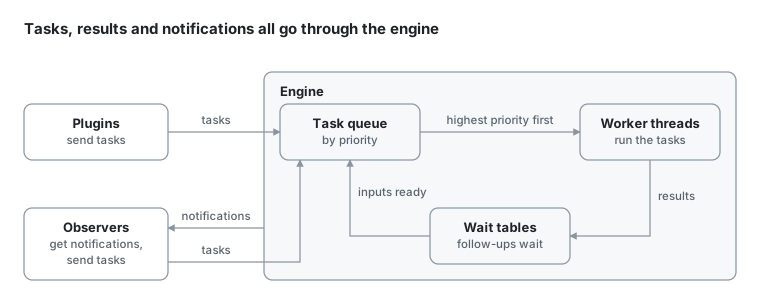
- Mailboxes: Every task, notification and result lands in one of four mailboxes, which only the engine reads, in the same order each turn: Thryve’s own status messages first, then tasks, notifications and results.
- The queue: Tasks wait in a priority queue, and a free worker takes the one with the highest priority.
- The workers: run the tasks, skip the cancelled ones, and report each result back to the engine.
- The wait tables: A follow-up, a join or a fan-out step waits there until its inputs arrive. Then it joins the queue like any other task.
- The observers: Notifications go to a sorter thread, which puts each in its observer’s queue.
Priorities run from 0 up to max_priority in the configuration, which is 4 by default and 14 at most, and higher goes first. Two rules shape that order:
- Realtime. The top levels, from 80% of
max_priorityrounded down, are realtime: those tasks always go before the others. With the defaults, that’s priorities 3 and 4. - Ageing. A waiting task gains one level every
aging_intervalseconds, 3 by default, so low-priority work still gets its turn on a busy engine. Ageing never makes a task realtime.
A follow-up inherits its task’s priority and a join takes the highest among its tasks, but neither inherits realtime: with the defaults, an inherited priority stops at 2. The configuration sets the rest, such as the number of workers:
[threads]
worker_count = 4

[tasks]
max_priority = 4
aging_interval = 3
How a run ends
A run ends when a task’s result type is Fin, or FinErr after an error. Any plugin, observer or task can send that task; in the example below, Console does, once every report is printed:
fn end_the_run(handle: &PacketHandle) -> Result<(), ThryveError> {
    let fin = Task::new("Shutdown", 0, || {
        TaskResult::new("Fin", "every photo is done".to_string(), "Main")
    })?;
    handle.send_task(fin)
}
- Shutting down: The engine stops taking new work and waits for the tasks still running, up to
shutdown_grace_period(10 seconds by default). Then the plugins’ and observers’ clean-ups run, and in interactive modeengine.join()returns. A task still running after the grace period is named inError.logand left behind, and the plugins aren’t cleaned up. - The logs: Each run’s log folder holds the
Mainlog, the logs the program registered, andError.log: errors no step took, work that never ran, a start that failed, and warnings from graph mode. - Panics: A panic in any task ends the whole process: Thryve writes it to
Error.logand exits with code 1. - The task graph: With debugging and
visual_graphon, Thryve records which line of code sent each task, and which task it came from. At shutdown it exports that graph and opens it in Topology, a program on Thryve’s release page that goes next to your program’s.exe.
The example
The repo’s examples put these parts together in one program, projects. It runs two unrelated projects in one engine: a report on a web server’s access log, and a count of the primes below 10,000,000. Both run at the same time, on the same 4 worker threads, and neither project names the other.
Each project is a plugin, and each one ends by sending its report to Console, an observer, which prints them both:
Access log report
Note: The following numbers are calculations from the log file and are not metrics related to Thryve itself.
  requests: 10000
  data sent in responses: 131.9 MB
  lines skipped (not requests): 3

Status codes
  200    9195   92.0%
  301      50    0.5%
  304     384    3.8%
  404     295    3.0%
  500      76    0.8%

Busiest pages
  /                       1784 requests     23 ms on average
  /api/tasks              1192 requests    195 ms on average
  /docs                    978 requests     29 ms on average
  /docs/getting-started    809 requests     34 ms on average
  /api/search              768 requests    740 ms on average

Alerts
  /api/search           slow: 740 ms on average
  /api/tasks            server errors: 6.4% of its requests

Primes report
Note: The following numbers are calculations about the numbers below 10,000,000 and are not metrics related to Thryve itself.
  primes: 664579
  twin-prime pairs: 58980
  largest gap: 154, after 4652353
These numbers are the example’s own output, not measurements of Thryve, and each report says so under its title. The log report counts a sample log of a made-up web server: 10,000 requests, written by a script in the repo. The prime counts can be checked: 664,579 primes and 58,980 twin-prime pairs below 10,000,000.
How a project declares its work
Each project declares all of its steps once, when the engine starts, and the engine runs each step as soon as its input is ready. The log report’s plugin, LogReader, reads the log in its entry point and hands the lines to declare_report, which is the whole report:
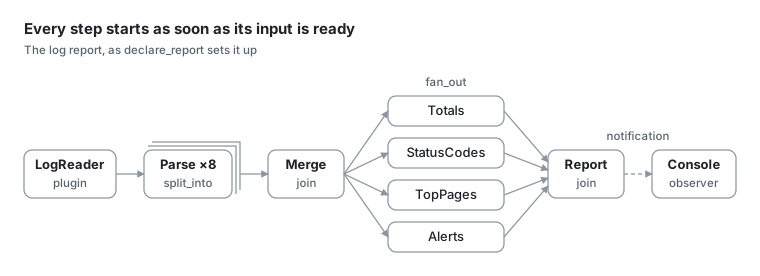
An arrow is what a step waits for: Merge starts once all 8 Parse tasks are done, and Report once all four sections are. The dashed arrow is a notification, not a task.
fn declare_report(tx: &PacketHandle, lines: Vec<String>) -> Result<(), Box<dyn Error>> {
    // Parse: the log cut into 8 pieces, each counted by a task of its own.
    let pieces = tx.split_into(lines, "Parse", PIECES, PRIORITY, parse)?;

    // Merge: once all 8 are counted, adds their counts together.
    let merged = pieces.join("Merge", merge)?;

    // The four sections, each written from Merge's counts, which they share.
    let mut group = merged.fan_out();
    let sections = vec![
        group.then("Totals", |counts| section(&counts, totals))?,
        group.then("StatusCodes", |counts| section(&counts, status_codes))?,
        group.then("TopPages", |counts| section(&counts, top_pages))?,
        group.then("Alerts", |counts| section(&counts, alerts))?,
    ];
    group.send_fanout()?;

    // Report: once the four are written, sends them to Console.
    let tx = tx.clone();
    sections.join("Report", move |written| report(&tx, written))?;
    Ok(())
}
- Parse:
split_intocuts the lines into 8 pieces and sends a Parse task for each, as in “Splitting, joining and fanning out”. - Merge:
joindeclares Merge, which runs once all 8 Parse tasks are done, with their counts in order. - The four sections:
fan_outshares Merge’s counts with Totals, StatusCodes, TopPages and Alerts, which can run side by side. - Report: A second
joindeclares Report, which puts the four sections together and sends the text to Console as a notification.
Each step is an ordinary function, and nothing in it waits or locks: parse takes its share of the lines and returns Result<Counts, io::Error>. Counting can’t fail here, but an error would travel the way “Advanced tasks” describes: Merge would pass it on to the four sections, and Report would send “The report failed: …” to Console in place of the sections.
The prime count is declared the same way, in three steps. Its plugin, Primes, splits the numbers below 10,000,000 into 8 ranges, one Sieve task each. Combine joins them, and Write, declared with then, sends the report to Console:
fn declare_count(tx: &PacketHandle) -> Result<(), Box<dyn Error>> {
    // Sieve: the numbers cut into 8 ranges, each sieved by a task of its own.
    let sieved = tx.split_into(ranges(), "Sieve", RANGES, PRIORITY, sieve)?;

    // Combine: once all 8 are sieved, adds up what they found.
    let combined = sieved.join("Combine", combine)?;

    // Write: once Combine is done, sends the report to Console.
    let tx = tx.clone();
    combined.then("Write", move |found| write(&tx, found))?;
    Ok(())
}
Two projects, one engine
Each project is a plugin, so the program’s list of projects is a list of names, each with the function that makes its plugin. Adding a project is one more entry:
const PROJECTS: [(&str, MakePlugin); 2] = [
    (log_report::PROJECT, |data, tx| {
        LogReader::plugin(data.join("access.log"), tx)
    }),
    (primes::PROJECT, |_data, tx| Primes::plugin(tx)),
];
The program adds the plugins of the projects named on its command line to one engine, or all of them when none is named. cargo run -q -p thryve_examples --bin projects -- primes runs the prime count alone, and neither plugin changes for that.
Neither project names the other. All they share is a notification: a project’s name and its report, addressed to Console. Console is an observer like Progress in “Observers”: it keeps each report until all of them are in, prints them in the order the projects were named, then sends a Fin task, which ends the run. So the output is the same on every run, whichever project finishes first.
How the two projects share the workers
Both projects’ tasks go into the one queue from “Inside the engine”, and the engine’s 4 worker threads take their work from it. The number of workers is one line in the configuration file the examples share: worker_count = 4.
- The report goes first: Its tasks have priority 2 and the prime count’s have priority 1, so when tasks of both are waiting, a free worker takes the report’s. Each follow-up keeps the priority of the step before it, and neither project uses the realtime levels.
- The prime count still gets its turn: A waiting task gains one level every 3 seconds (
aging_interval), so on a busy engine the Sieve tasks would catch up with the report’s. In this example the queue empties long before any task has waited that long.
What one engine costs
Sharing an engine means sharing more than its workers:
- One project’s
FinErrends both: If LogReader can’t read the log, its entry point returnsFinErrand the engine stops, so the prime count never prints either. - One place decides when the run is over: A
Finends the engine for every project in it, so the projects need one decider. Here, that’s Console. - A panic ends the whole process, whichever project it came from. Thryve writes it to
Error.logand exits with code 1. - One configuration: The projects share the number of workers, the maximum priority levels and the ageing interval.
Not only Rust
The same projects program is in the repo in C, C++ and Python, and all four print the same output from the same log. They call Thryve through its C API:
- C and C++: use the C library, with its C and C++ headers, built with CMake or GNU Make. With MSVC, CMake can also build Thryve into each program, which then runs without the DLL.
- Python: uses
thryve.py, the C API throughctypes: standard library only, nothing to install. It loads the DLL, sincectypescan’t load a static library.
Every number in the reports is worked out with whole numbers, and every list is sorted the same way, so the four languages agree to the last character. The C++ guide and the Python guide show how to write programs like these.
Try it
You need Windows on x86_64. From the root of the repository:
cargo run -p thryve_examples --bin projects
cargo run -p thryve_examples --bin projects -- primes
The C and C++ versions build with CMake, against this repository’s build of the C library (cargo build -p thryve_ffi) or the download on the release page:
cmake -S examples/c_cpp -B examples/c_cpp/build
cmake --build examples/c_cpp/build
The Python version needs the C library too, and nothing else:
cargo build -p thryve_ffi
python examples/python/projects.py
The examples’ README has the rest: GNU Make, the release download, and building Thryve into the C and C++ programs.
What would you run on it?
Each project is a plugin of a few declared steps, and adding one more is one entry in a list. What would you put next to these two? Reply wherever you found this post. The code is on GitHub.